Jolicloud OS is just Ubuntu Netbook Remix

0 minutes, 24 seconds

After seeing a post over on Engadget about the new Jolicloud,  I decided to check it out. It quickly became apparent that it is just Ubuntu Netbook Remix (UNR) with a different skin and a nice Jolicloud app.  Looking at some forum posts and the comments on the above Engadget link, my opinion isn’t too novel or new. What is dissapointkng is that Engadget fronts like this is something more amazing than UNR’s latest release, which I run and like.

Me? I’m waiting for Meego 1.1 which is expected to drop in October.

Google: gmail, mail and calendar sync with Meego Netbook (Google Apps Too!)

0 minutes, 36 seconds

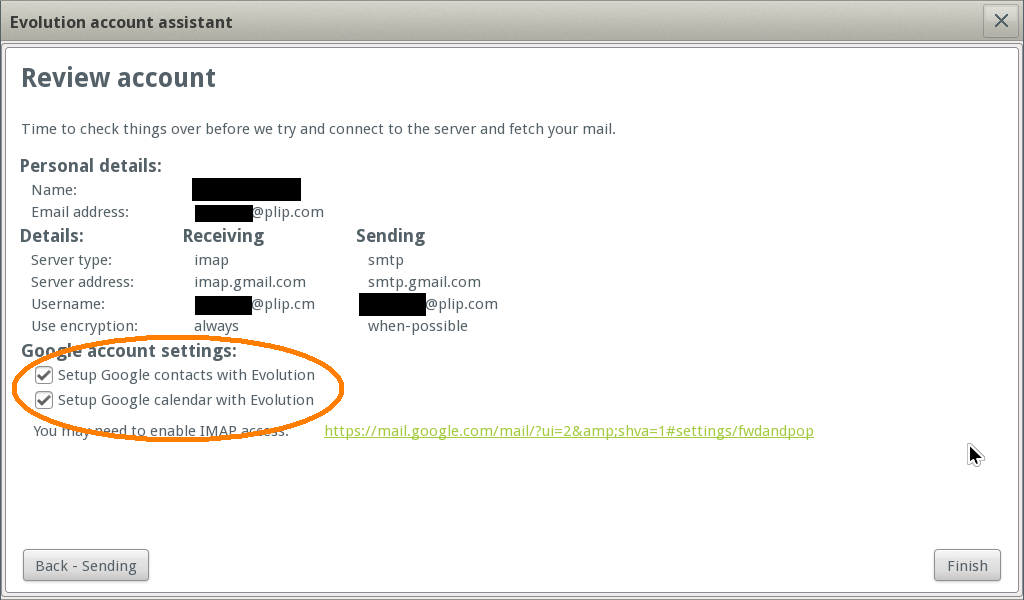
Recently a reader inquired about how to set up Meego to sync with gmail mail, calendar and contacts based off me mentioning I got it working.  I use Google apps for mail hosting at plip.com, so this applies to both gmail and Google Apps (domains that use gmail for their email server).  Settings are based off IMAP settings for Thunderbird.

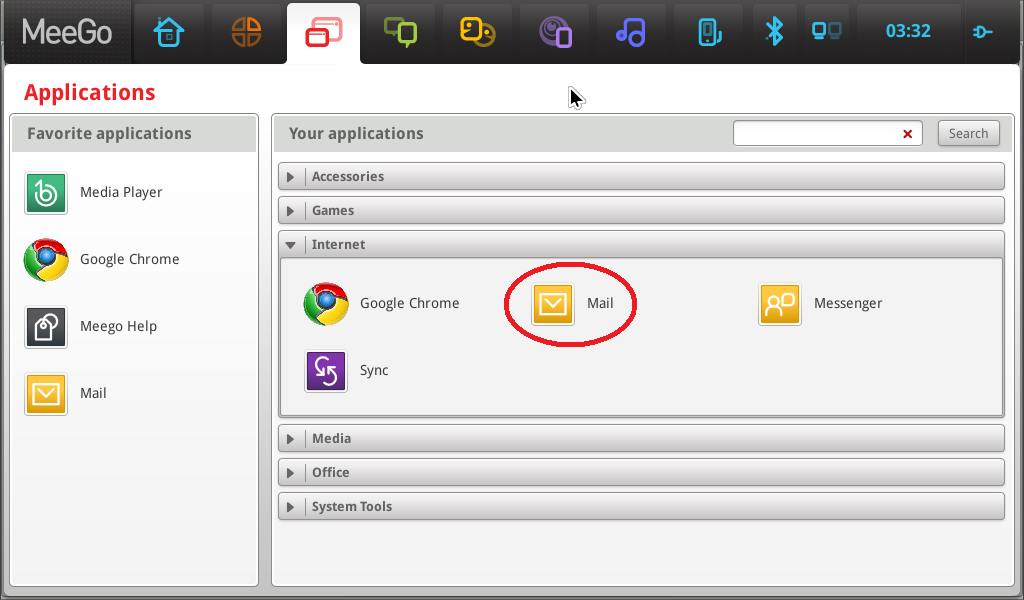
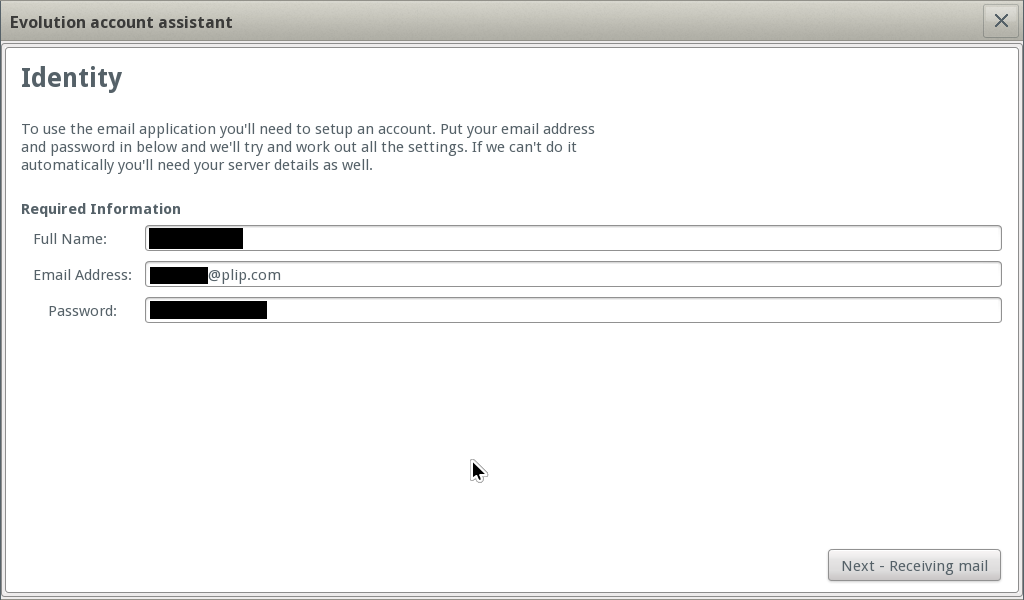
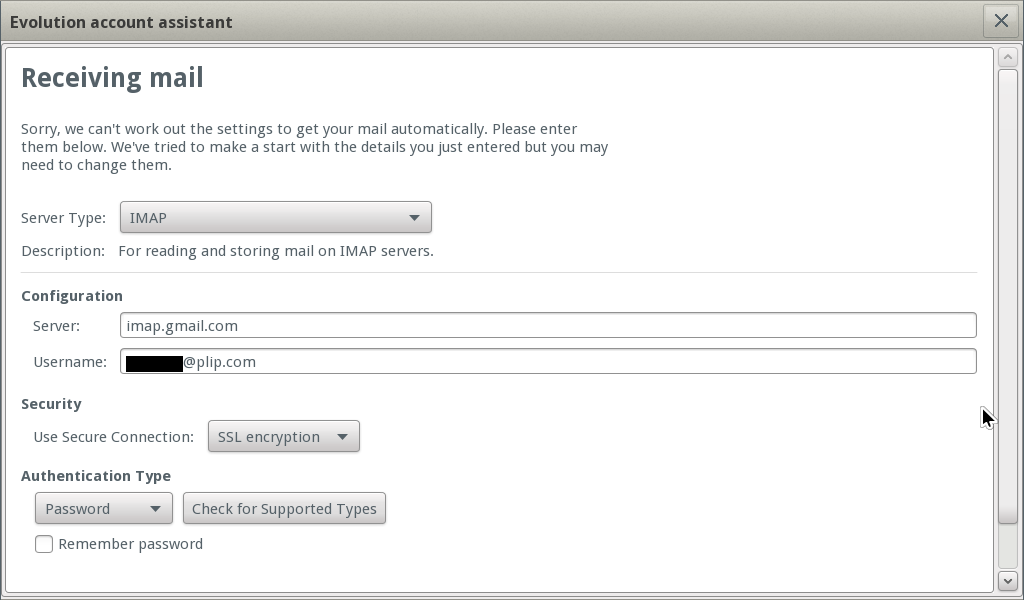
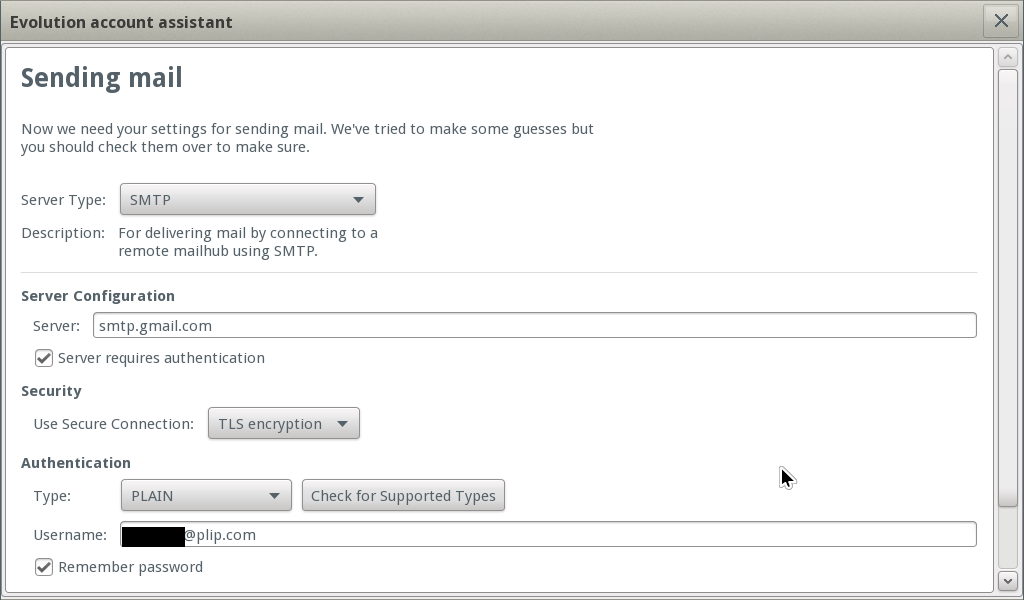
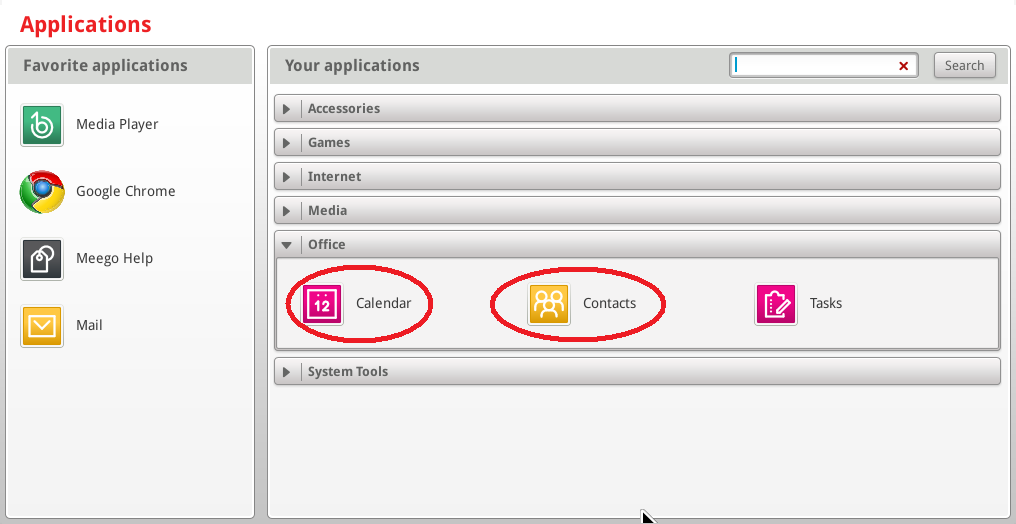
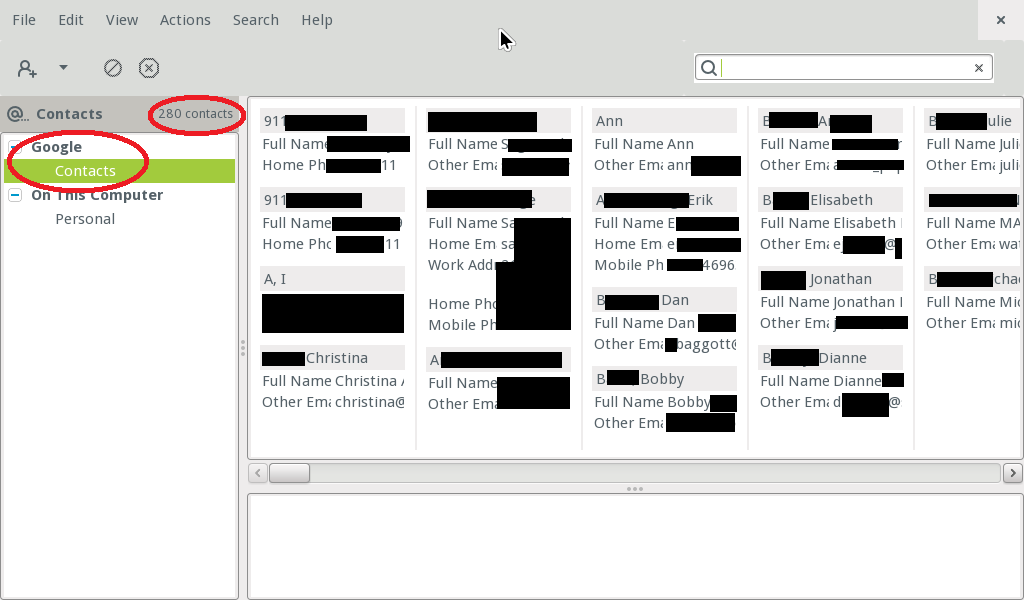
Here’s the steps I took for a clean install of Meego (see matching screenshots below too):

  1. Launch Mail for the first time
  2. Enter your Google Apps or Gmail login info (per google IMAP or thunderbird )
  3. Choose IMAP (again, per google IMAP or thunderbird )
  4. Configure SMTP (again, AGAIN per google IMAP or thunderbird )
  5. Confirm and make sure contacts and calendar are checked
  6. Mail Works!
  7. Launch Calendar and Contacts
  8. Contacts synched!
  9. Calendar synched! (no screenshot :( )

WordPress 3.0 Released – Time To Upgrade

0 minutes, 18 seconds

As I’ve mentioned time and time again, you should keep your WordPress instance up to date. Go upgrade today! I just did and it worked with out a catch. Ever since 2.7 when they released autoupgrade with SFTP support, It’s much more simple to keep things current. Don’t open up FTP to your server (no passwords in the clear!), but do open SFTP and make your life much easier.

Baby Spider Pictures

0 minutes, 21 seconds

My in-laws have an awesome back yard and against their above ground pool I found a mom and her baby spiders hanging out in their web. After finding an improv light source of an upside-down steel dog bowl for a mirror and a watering can as the mirror tripod, I had an impromptu photo shoot. Only four or five came out OK. I aspired to make them as good as Hans’, but no luck. Where’s my DSLR and macro lense?!

Ubuntu Netbook Remix update

0 minutes, 54 seconds

I know, I know you have been waiting to hear how it is going with new OS on the netbook. Well my dear readers, I have some good news and some bad news.

First the bad news. The bad news is that Meego really felt snappier and more polished. Though there’s a lot of overlap in software like Evolution is standard on both, something about the simplicity of Meego won out. Both come with a simple window manager and both can be easily extended with new apps, but Meego was more of what I wanted and less of what I didn’t. Example: auto hide task bar on Meego is nice because screen real estate is so precious. This I want. Ubuntu entire open office suite, this I don’t want. Also, Meego loads apps faster (eg Chrome) and boots waaaay faster.

Now the good news: the sleep problem is fixed and AIM totally works. The sleep fix was very satisfying, just follow the included script on superuser totally worked. Snap the lid shut and it goes right to sleep. Click the power button and it springs back to life in under a second. In general Ubuntu is quite nice.

I wonder how EasyPeasy is doing these days?

Bye Bye Meego, Hello Ubuntu Netbook Remix

0 minutes, 54 seconds

Meego, as I mentioned before, is really really cool. I was able to get all my apps installed and even managed to get my Google calendar, mail and contacts syncing by just adding it via the email client under IMAP (BTW – Meego, you should really highlight that feature!). All the apps even appeared as a native icon alongside the pre-installed ones which is a really nice touch. Alas, the lack of a working AIM client is just too much. It’s my primary IM network and it just bugged me that it didn’t work. Which is too bad, because Meego is so close to being perfect. Well, too about AIM and about sleep.

So, what to do? After reading Mr. Doctorow’s latest post, I was reminded about good ol’ Ubuntu. Sure enough, there’s a Netbook remix. Let’s give it a whirl! USB key is prepped and primed and install is imminent.

Also – I love love love (yeah, 3 times) Pendrivelinux.com!. This is a super easy way to create bootable USB drives (aka live “CDs”) of your local linux distro. The old days of some crazy fdisk silliness is gone. Now it’s just point and click. Love it.

Stay tuned for my Ubuntification!

New Love: Meego

0 minutes, 44 seconds

A bit ago I read a post about Meego 1.0 being available. I had a Acer great netbook that was suffering from a slow slow install of XP. I’d been thinking of going to Linpus, which originally shipped with the Aspire Ones. However, Meego had great live, bootable USB download which allowed me to give the whole OS a spin on my hardware. Everything just works: webcam, USB bluetooth dongle, wifi, NIC and internal SD Card.

Last night, I took the plunge and installed it over XP.

Today, I’m happy to report I’m never going back to XP on this lil’ guy. I got Dropbox, KeepassX, Synergy and sshd all working with out a lot of hassle. The boot time is insanely fast. Google Chrome is WAY faster than FF3.6 in XP. I am a very happy camper.

Go Meego today! Full disclosure – sleep looks to be broken :(

Update: It looks like AIM is broken too. That’s a real bummer because it’s my main IM network.

Broccoli, Tofu and Quinoa

0 minutes, 3 seconds

The wife busted this dish out a few nights ago. Tasty times!

Plip’s Vimeo JavaScript Embedder v.02

0 minutes, 55 seconds

OK, I just finished doing up version .02 of Plip’s Vimeo JavaScript Embedder v.02. I’d say it’s stealable, but that you’ll likely want to wait a bit for. There’s a couple of reasons:

  • It doesn’t work in IE8
  • It’s lot’s of code chunks instead of one tidy package
  • I’m not done with it

While doing research for this I found the Video for Everybody project which I love. You should definitely check it out and this may be where I try take this project:

Video for Everybody is simply a chunk of HTML code that embeds a video into a website using the HTML5 <video> element, falling back to Flash automatically, without the use of JavaScript or browser-sniffing. It therefore works in RSS readers (no JavaScript), on the iPhone / iPad (don’t support Flash) and on many, many browsers and platforms.
camendesign.com

My gut feeling is that this solution won’t work until Vimeo changes things a bit. Right now the main point of my work here is to fetch the large thumbnail which currently has to be done by JS. Using JS goes against everything Video for Everyone stands for. Still, super cool and possibly a worthy non-JS solution.

Stay tuned!

Smartphones + small screens = Phishing!

1 minute, 13 seconds

I just read internet’s famous Cory Doctorow’s very interesting post about how he got phished (!). What struck me was not his whole parasite-perfect-timing-phone-reset scenario. The take away for me was that on a small screen you can’t see the entire URL of where you’re going. I can imagine a scenario where phishers look up your friends on facetwitt, send you a “personal” note with a perfectly crafted URL to fit you iphonedroid’s browser. Your phone would hide the fact that you’re not logging into the site you think you are. Yikes!

I’m currently abstaining from all social networking sites. They’re totally awesome and fun and a great way to keep in touch with friends far and near. However, my security hackles go up too high with them, so I’ll have to be happy with my blog and its 4 readers instead of an intensely well read facebook wall (that’s what the kids call it, right?).

Phishers often depend on super popular site like twittface to spam you with a note from a service you’ll likely be using. I laugh these off because I don’t use any them. But if I was a phisher, I’d programmatically crawl the feeds to figure who your friends are and who you actively communicate with. I’d then watch out for nouns and verbs you’d expect in a message based on the vernacular your lil’ group uses, and then I’d phish you like a bunch of mom’s on their iMacs (my mom and her iMac excluded, of course!).

This post largely written on WordPress for Android in casual carpool. Fun!