Meego 1.2, Meego Laptop and a MacBook Air

1 minute, 40 seconds

As many of you know, I’ve had an on again, off again, and then on again affair with Meego. I love that lil’ guy! You may have expected me to be quite excited about the recent release of Meego 1.2, including a netbook refresh. Since I was running Meego on a netbook, you may have then also expected me to be super excited about the very recent announcement of the ASUS Eee PC X101. This is a 2lb laptop that runs Meego and is expected to cost $200. Sweet!

However, as you may have guessed from the title of this post, I’m not running Meego any more. I’m running OS X on a MacBook Air 11″. I had crossed the threshold of tinkering around on a laptop, to wanting to commute with one every day. Indeed, 2lb was my sweet spot for a laptop. I wasn’t that stuck on the OS as my apps are all cross platform enough. I seriously considered many different netbooks and then the MacBook Air came out. The 11″ was just over 2lb, included a full size keyboard, had a 1366 x 768 screen and a 5 hour battery. It was also insanely small. For a relative paltry $1000, there was simply no laptop, regardless of OS, that had had all of the above features. Period. Though I think the new Eee X101 will be very cool, it lacks the screen resolution of the Air. I briefly considered the Sony Vaio X (no longer available) which met all my requirements, but it was a pretty penny to pay for an Atom processor.

“But if you want something super light, what about a iPad?”, you ask? I do agree, an iPad’s insanely long battery life coupled with 1.3lb weight has some handy uses: a cross country plane ride, long regular commutes where you want to read the news and browse email or need a super light weight video conference rig. But what about when you want to run an IDE? What if you want to compose a 3 page (7,500 character) long email? What if you want to flip back forth between the 3 browsers you have open to check how your code renders? The answer is clear: you need a laptop.

I’ve been super happy with my Air and I wish the best of luck to Meego.

Oil, Water and tasty Vodka

0 minutes, 36 seconds

Well, OK, not all three together. First up, while doing dishes some hot water hit some congealed butter at the bottom of a Pyrex. The butter melted, but not into tiny particles, but into larger circles. It was memorizing. Well, it was for dorks like me, have a looksee:

http://vimeo.com/23070136

Now on to the tasty Vodka. This is slight variation on the standard Cosmo:

  • 1 part Imperia vodka
  • 1 part Cointreau
  • 1 part cranberry cocktail
  • Juice from 1/2 a small lime

The best part? I’d tried to do the same with tripple sec and a lemon the night before and my super cool wife bought me the right proper Cointreau and a lime. I came home to find this (see first pic) which I had to make into a tasty drink using the above proportions:

Why should I cut up my credit card?

1 minute, 2 seconds

Recently, some one got a hold of my card and was making fraudulent charges on it. My card company was Johnny on the spot and called me to verify the charges (side note: I had no way of verifying they were who they said they were, so they did the right thing and told me to call the number on the back of my card. You can’t be too vigilant!). When I finally got a rep. on the line, they canceled my card and sent me out a new one. Done deal.

But then they tell you, “cut up your card”. Why? If the number was stolen and we’re de-activating it so it can’t be used again, why cut up the card? In fact, why would you ever cut up the card? I guess if you think that cutting it up an active card will stop you from using it, then you should do a good job and cut it real good. But otherwise, I can’t think of a reason. My 5 minutes of googling didn’t find an answer either.

Do any of my faithful readers have an answer?

Update: There’s some good discussion below, but more notable is my comeuppance! After writing this post, I got not, one, not two, but three copies of my new card. Now I have the need to trash three credit cards that are all not canceled. Oh the horror!

How to spam this blog

1 minute, 40 seconds

As a follow up to last week’s post (How to comment on this blog), this week I bring you the results of the no-captcha test.

After much spam slipping through reCAPTCHA, I decided to nix a captcha all together. Originally I thought that just requiring a field via javascript and doing no server side checking would work. This was silly of me, of course. The spammers, having the source code of WordPress, would just blindly submit a comment to any post, bypassing any client side JS checks I had in place.

The fix was to create a field that was not known to spammers like the reCAPTCHA is. Further, if it is appended via javascript, then it is even harder to automate. I wrote the simple-math plugin (have a copy!) and implemented it as follow:

  • Turn off reCAPTCHA
  • Add a field via javascript
  • Ask a simple math question, validated in client side JS
  • Only validate that the field exists, not that the math is right, on the server side

The jury is, and I’m fully vindicated. Here’s the stats:

Hits Comment
Attempts
Comment
Succeses
Attempts
per
Visit
Defense
Success
Rate
Feb 6th-12th 1191 57 17 4.79% 70.18%
Feb 12 11pm – Feb 13 10am 58 20 13 34.48% 35.00%
Feb 13th-Feb18th 1204 132 0 10.96% 100.00%

#spamstats td, #spamstats th {padding:4px;margin:5px}
#spamstats td {text-align:center;}
#spamstats tr:hover {background:#ccc}

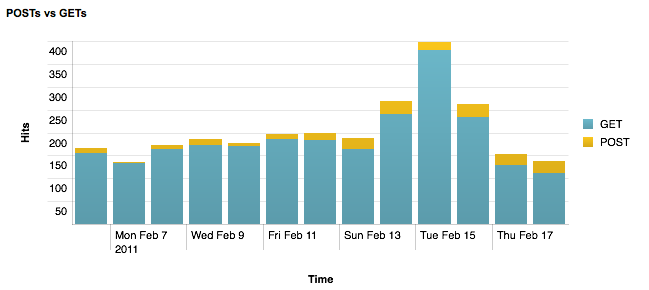
The important thing to note is twofold. The first is that the average number of raw hits (excluding me, yahoo and google) was the same week to week. Further, the number of attempts went up 200% of which 100% were thwarted (Defense Success Rate). Again, I suspect this is all possible because it’s not easy, nor worth while (it’s OK, plip isn’t a big blog, I know…sniff) to automate spamming against one off solutions like mine.

I should note that I used the free version of Splunk to garner the ad hoc stats for this post. As I was hemming and hawing on whether to count cookies or IPs or hits, it wasn’t worth while to use the old school command line style stats. Splunk scoffs at this level of stats and reporting. Really, it’s above it, but will happily crank out what you ask for it with ease. Here’s a purty graph:

Caveat Emptor: I work at Splunk.


How to comment on this blog

1 minute, 20 seconds

It seems that reCAPTCHA is a victim of its own success. Y’all know I’m a huge, huge fan. However, recently the spammers have started to submit comments, successfully getting past the reCAPTCHA . I suspect this is a mechanical turk or some such tomfoolery. Of course the comments don’t get approved, but they’re still a bother to have to delete.

Our friend over at hanskellner.com ( guess which friend?) also has the same problem with submitted span. This makes it clear that reCAPTCHA is being targeted (well, not clear, but it’s better than n=1!). However, he found a solution to stop the spammers. He added a static math question to his comment form. That is, it’s always “what is 5 + 6”, never any other question. Funny enough, his spam stopped all together. He still has his reCAPTCHA giong, but now it’s a two factor anti-spam.

I posit that the reCAPTCHA code is easy enough to programmatically detect, but some random math question isn’t, so it breaks the spam scripts. Let’s test this theory, shall we? I’ve just written a word press plug-in called simple-math. Using a simple to hack, all client side javascript there’s now an easy to solve math problem on the comment form. It is random, choosing two numbers between 0 and 9. I haven’t tested it too broadly, but you’re welcome to a copy.

I’ll let it run for a week and see how it goes and report back.

Feb 13th Update: I fought the law, and law won! Spammers got past round one of simple math. I’ve updated it to now check for the existence of the field on post, but still, no checking for a right answer on the server. As well, the field is created via javascript. Spammers, back to you for round 2.

Spicy Vodka Martini

0 minutes, 44 seconds

Wow! I doubt I’m the first to discover this, but a spicy Martini is damn tasty. Here’s how it went: Our friend from twtitw was over and had brought a batch of his tasty Pickled Carrots. The next day I was enjoying the last few carrots and paused. “Hmmm, you know what would be good?”, I thought aloud. “A spicy martini with the dregs of the pickled carrot juice!”. Indeed, it’s true.

I started by taking the recipe from Chronicle Books’, “Mini Bar: Vodka“:

  • 2 shots vodka
  • 1/2 shot vermouth

Pour the two ingredients over ice in a shaker, shake, decant into an iced glass and add in twist (w00t!) or olives (gross).

My version is the same, but instead of vermouth, I used the pickle juice and instead of a twist I used some of the jalapenos. The end result is oh my, just so tasty! I’m not sure why I’m adding these photos, they’re pretty bland and poorly lit.

Sunlight, flowers and a baby’s butt

0 minutes, 17 seconds

These photos were taken over a 24 hour period. Though I didn’t know when I started with the sunset last night (first up below), these photos very much ended up being an homage to my friend Steven and his blog. Primarily I appreciate his pause in the day to take photos of the lake and reminder that your devices are not your master.

Meego Redux: 1.1 Released

1 minute, 33 seconds

If you recall, I fell in love with Meego a bit ago. Then, we broke up, and I left Meego for Ubuntu Netbook Remix (UNR). Guess what? Yup, just like the title of this post suggests, I’m back to Meego. Yesterday was their 1.1 release and the netbook flavor with Chrome is ready for the Live USB Key, easy install testing. I skipped over the live USB thing and cut right to the chase to install it over UNR.

I went to go install some of the key apps that I use and bumped into a few problems. I’ll sketch ’em out here in case any one else is an early adopter like me:

  • No more yum: Well, yum is still available to install, but it’s not there by default. Instead the fine folks at Meego are shipping ZYpper instead. Works just the same, but for the not so distro savvy nerds like me, I had to search around in the forums to figure what was what. Thanks physalis!
  • KeepassX: The next problem I found was that Keepassx’s download page had 404 links for the fedora packages. When I found that Fedora 12 page DIDN’T 404, I downloaded THAT version of KeepassX. Welp, that version didn’t like the current version of QT that ships with Meebo. Finally, I searched around and found a slightly out of date version at hany.sk
  • Dropbox: Nothing really tricky here. Their download page has a “Fedora (x86 .rpm)” package. For both KeepassX and Dropbox, it looks like this to install it :
    sudo zypper install nautilus-dropbox-0.6.4-1.fedora.i386.rpm

For those keeping tabs, I did do a write up on configuring Meego mail and calendar which appears to all be the same in 1.1 as it was in 1.0. At first blush, it seems a little tricky to set up with Google Apps, where plip.com’s mail is, but we’ll hack away.

Next up: Installing Skype. Happy Meebo-ing!

Update: Skype installed no problem, and QT warning seems to be around fonts. A forum tip around font hinting worked wonders to make Skype and KeepassX look sharp (actually, look anti-aliased).

Apple’s fancy monitor cheaper than Dell’s

0 minutes, 50 seconds

For a long time now I’ve been a fan for Dell’s monitors. I was one of the first folks at work who suggested we cut over from Apple’s expensive (and prettier) monitors to Dell’s cheaper (and more utilitarian looking) monitors. This is all due to my obsession with hi-res and large monitors.

Very recently, I noticed something odd: Apple is now cheaper than Dell in the big monitor game. The new hotness is IPS for high contrast and great viewing angles (here’s the crappy wikipedia IPS link). Yup Dell’s 27″ U2711 is $1100 or their 30″ U3011 is $1500. Apple is no longer selling (or not really trying to sell) their 30″ and their (only?) monitor, the very same one in the iMac, is a 27″ LED Cinema Display for $999. Black is white, up is down and dogs are living with cats.

This all said, you’ll have to deal with super future thinking Apple and their mini DisplayPort only monitor. However, it does come with speakers and nice webcam. For now though, I’m still gonna stick with my 24″ Dell I’ve had for the last 4 years or so. Frickin love that thing.

Wayback machine, privacy and old plip.com

1 minute, 16 seconds

This post is a short parable told in three lessons:

Lesson 1: The web is not as temporal as you might think!

Recently a co-worker was travelling and was unable to access her work based email. Instead, she directed folks to email her at her personal email. Being a curious fellow, I clicked over to her personal site to see what she had to say. All I found was “Site in progress, check back later” and link to a very outdated resume. Well, that’s just no fun! Enter the wayback machine! Using this fine site, I was able to see all the text, photos and links she had long since redacted. The wayback machine never forgets, so don’t you forget that.

Lesson 2: Robots.txt can pull Jedi mind tricks.

A natural response to seeing the archive of other sites, is to see what dirt folks might find out about me via the same method. Sure enough, there’s some good stuff! However, the more interesting fact I learned is that my robots.txt of today redacted the archive.org copy of yesterday! This is cool! A while ago I took down my resume and some older, more personal content and as well took a sec to make some broad strokes of search engines shouldn’t index. It was these actions that archive.org took note of. With a wave of my robots.txt hand, indeed these are not the pages you’re looking for.

Lesson 3: The wayback machine is way cool.

Ok, this parable kinda peters out right about here, but still, the wayback machine is way cool. Check out the rad looks plip.com has had over the years! Hrm, maybe that should be “rad”. You decide.